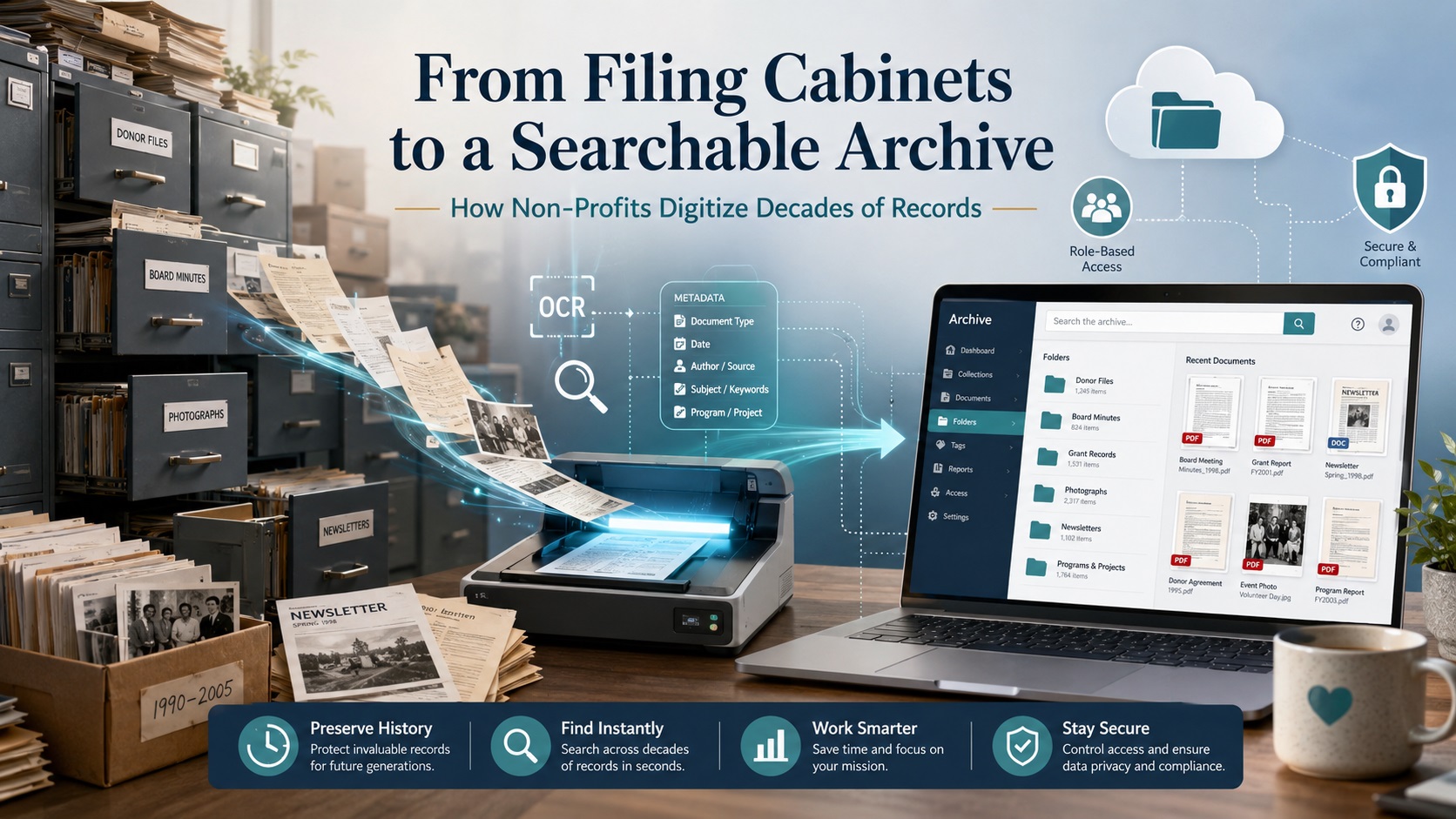
What happens when a non-profit founded in 1970 has decades of records spread across 50 filing cabinets and 250 fully packed drawers?
At that scale, digitization isn’t just a storage solution; it’s an institutional memory preservation project.
A single digital educational portal from the National Archives launched with roughly 3,000 documents, images, and recordings from their holdings. (Source).
The challenge isn’t just scanning that volume; it’s keeping records searchable, secure, and connected to their original context.
A searchable online archive works only when digitization is planned before scanning begins: audit cabinets, preserve folder structure, apply OCR, add metadata, assign access levels, and organize by record type, date, department, donor, grant, program, and retention category. Without this structure, you replace 250 drawers of paper with thousands of disconnected PDFs. With the right plan, those records become a trusted archive that reduces storage pressure, protects institutional memory, and gives staff faster access to critical information.
Why Non-Profits Are Still Buried in Paper Records?
Most long-standing non-profits did not create large paper archives by choice. Filing cabinets were once the simplest way to store donor records, board minutes, grant files, financial documents, volunteer forms, program reports, newsletters, photographs, and correspondence. Over the decades, those records became the organization’s working memory. Over time, staff turnover, inconsistent folder names, and changing retention practices make older filing systems harder to search and govern.
The problem begins when the archive outgrows the people who understand it.
That creates three common problems:
- Records become hard to find. Staff may need to search by donor name, grant cycle, board decision, program year, event, or department, but paper folders rarely support fast retrieval.
- Important context gets lost. A file may make sense only when it stays connected to its cabinet, drawer, folder label, date range, and record category.
- Storage becomes expensive and risky. Filing cabinets take up office space, slow down audits, limit remote access, and expose aging records to moisture, pests, fire, fading, or handling damage.
For non-profits, this is not just an administrative issue. That is why a successful nonprofit records digitization project begins with archive planning, records assessment, metadata strategy, and access control before the first page is scanned.
What Types of Non-Profit Records Should Be Digitized?
Digitize records that support governance, funding, compliance, operations, and institutional memory. Priority depends on access needs, protection requirements, retention length, and preservation value.
For long-standing non-profits, the most valuable records fall into these categories:
| Category | Record Types | Priority Considerations |
| Governance | Board minutes, bylaws, articles of incorporation, committee notes, policies, and strategic plans | Permanent preservation; may need restricted access |
| Financial & Tax | Annual returns, audit files, budgets, expense records, donation receipts, payroll, invoices | Audit/tax compliance; restricted access for sensitive data |
| Donor & Fundraising | Donor correspondence, campaign files, pledge records, grant applications, sponsorship documents | Restricted access; tied to funding cycles |
| Program & Service | Project reports, beneficiary documentation, case files, event records, outreach materials, impact reports | Internal access; connect to program outcomes |
| Historical & Public | Newsletters, photographs, brochures, press clippings, annual reports, awards, and founding documents | Public archive value; captioning/dating needed |
| Administrative & HR | Volunteer forms, staff records, training files, contracts, insurance, vendor records | Tight privacy controls; retention review required |
These categories shouldn’t be treated as one flat scanning pile. Group records by four questions:
- What must be kept for legal, tax, or governance reasons?
- What is frequently needed by staff, volunteers, auditors, or board members?
- What contains sensitive donor, financial, personnel, or beneficiary information?
- What has long-term historical or mission value?
This classification determines scanning priority, file naming rules, OCR requirements, metadata fields, access permissions, and whether paper originals should be returned, retained, or destroyed after digitization.
Digitization Is More Than Scanning: The Real ROI for Non-Profits
The return on investment for non-profit record digitization is usually measured in reduced storage pressure, faster retrieval times, better audit readiness, and lower dependence on staff memory. A searchable archive also helps non-profits avoid repeated manual searches across filing cabinets, off-site storage facilities, or legacy folder systems that slow down daily operations.
Digitization can support ROI in four practical ways:
- Space recovery: Eliminate the need for physical filing cabinets, dedicated archive rooms, or off-site storage facilities. This frees up valuable office space that can be repurposed for staff workspaces, meeting rooms, or program activities, while also reducing monthly rent or storage facility costs.
- Staff efficiency: Enable faster access to donor files, board minutes, grant reports, financial records, and program documents. Staff no longer waste time searching through physical cabinets or requesting files from off-site storage. A searchable archive allows any team member to retrieve documents instantly from their desk, reducing administrative overhead by 30–50% and freeing up time for mission-critical work.
- Risk reduction: Lower exposure to misfiling, physical damage, lost records, and uncontrolled access. Paper records face constant threats from moisture, pests, fire, fading, and handling damage. Digitization creates secure backup copies that survive physical disasters. Role-based access controls also prevent unauthorized viewing of sensitive donor, financial, or beneficiary information.
- Records control: Enable clearer retention review, secure destruction decisions, and long-term archive planning. Metadata fields track retention categories and review dates, making compliance audits easier. The archive identifies which records are active, historical, or ready for secure destruction, helping non-profits meet legal requirements while avoiding unnecessary storage of outdated documents.
Step-by-Step Process for Digitizing Non-Profit Records
To digitize decades of records, follow this workflow before the first page is scanned:
- Audit the records: Count cabinets, drawers, boxes, folders, oversized items, and fragile materials. Note record type, date range, condition, and confidentiality level.
- Sort by record category: Group board minutes, donor files, grant documents, financial records, program files, HR records, photographs, newsletters, and historical materials.
- Define retention and access rules: Identify which records must be kept, restricted, shared internally, made public, or reviewed for secure destruction after scanning.
- Prepare documents for scanning: Remove staples, clips, binders, rubber bands, and sticky notes while preserving folder labels and original order where needed.
- Scan at the right quality level: Use standard document scanning for routine files; higher-quality imaging for fragile, historic, photographic, or public archive materials.
- Apply OCR: Make printed or typed text searchable by names, dates, grant titles, board actions, program terms, and donor references.
- Add indexing and metadata: Tag files by record type, year, department, donor, grant, program, folder title, confidentiality level, and retention category.
- Run quality control: Check for missing pages, unreadable scans, wrong file names, duplicate files, poor OCR output, and indexing errors.
- Upload to a secure archive: Store final files in a cloud repository, document management system, archive platform, or internal records system with access permissions.
- Train staff on retrieval: Document how users should search, download, restrict, update, and request records.
For a 250-drawer archive, this order matters. If files are scanned before folder structure, metadata fields, and access rules are defined, you’ll end up with thousands of searchable but poorly organized PDFs. The best workflow preserves useful original order while improving inconsistent filing.
How OCR Turns Paper Files Into Searchable Records?
OCR, or optical character recognition, converts printed or typed text in a scanned image into machine-readable text. Without OCR, a scanned document may look digital but still behave like a photograph. Staff can open it, read it, and store it, but they may not be able to search inside it.
For non-profits, OCR is useful because it helps teams search across decades of records by:
- donor names
- grant titles
- board decisions
- program names
- campaign dates
- invoice numbers
- event names
- committee references
- locations or service areas
OCR is especially valuable when records are spread across hundreds of folders. Instead of opening one PDF at a time, staff can search for a keyword, name, date, or phrase across the archive.
However, OCR is not perfect. Accuracy depends on the condition and format of the original record. Clean typed pages usually produce better results than faded photocopies, handwritten notes, carbon copies, stained documents, folded pages, or records with unusual fonts. Older non-profit archives often contain all of these formats, so OCR output should be checked during quality control.
OCR also does not replace indexing or metadata. A searchable PDF may help users find words inside a document, but indexing tells them what the document is, where it belongs, who should access it, and how long it should be retained.
For example, a scanned grant agreement may include searchable text, but it still needs structured details such as:
- funder name
- grant year
- program name
- document type
- reporting period
- confidentiality level
- retention category
The strongest nonprofit digital archives use OCR for full-text search, indexing for retrieval, and metadata for long-term records control. Together, these layers turn scanned paper into searchable records that staff, board members, auditors, and future leaders can actually use.
How to Build a Searchable Online Archive for Non-Profits?
A searchable archive should help users find records by meaning, not just file name. Strong archive structure includes three layers:
| Layer | Purpose | Example |
| Folder taxonomy | Main hierarchy grouping files | Governance → Board Minutes → 1990–1999 |
| Metadata fields | Structured details for search/filter | Donor name, grant year, board meeting date, document type |
| Searchable text | OCR-generated full-text search | Keyword, name, date, phrase, or reference number |
Example archive structure:
- Governance → Board Minutes → 1990–1999
- Grants → Funder Name → Grant Year → Reports
- Development → Donor Records → Campaign Name → Year
- Programs → Program Name → Reports → Photos
- Historical Archive → Newsletters → Decade
Access Control Matrix
Build access control from the start. Not every record should be available to every user:
| Access Level | Record Types | Who Can Access |
| Public | Newsletters, annual reports, photos, press clippings, and approved historical materials | Everyone |
| Internal Staff | Program reports, administrative files, policies, and non-sensitive working records | Staff only |
| Restricted | Donor records, HR files, financial documents, legal records, beneficiary files, confidential board materials | Staff + Board + Auditors |
| Confidential | Beneficiary records, personnel files, sensitive donor communications, legal disputes, insurance claims, and records involving minors | Executive team only |
The archive must be consistent enough that future staff can understand the system without relying on one person’s memory. Success means users can quickly answer: Where is the 2008 grant report? Which board meeting approved this policy? What photos exist from a past event?
Security, Privacy, and Compliance for Non-Profit Records
Non-profit archives often contain donor information, financial files, employee records, grant documents, board materials, legal records, and beneficiary details. These records should be classified before scanning begins, using the access control matrix above.
Security should be built into the digitization workflow, not added after scanning. Each record group should be tracked from intake through scanning, indexing, quality review, delivery, and final disposition. Professional scanning helps protect the chain of custody, indexing accuracy, confidential handling, and quality control.
Should Non-Profits Digitize Records In-House or Outsource?
Small scanning jobs can be handled internally when records are recent, low-risk, and easy to organize. Large archive projects are different. A 250-drawer filing cabinet collection may include donor files, grant records, board minutes, financial documents, photographs, fragile papers, and confidential materials that require controlled handling.
| Factor | In-House Scanning | Professional Scanning Service |
| Best fit | Small, active, low-risk files | Large archives, mixed records, confidential files, historical materials |
| Staff time | High internal time required | Lower internal burden after planning |
| Equipment | Office scanner or copier | High-volume scanners and specialty workflows |
| OCR and indexing | Basic or inconsistent | Structured OCR, indexing, metadata, and file naming |
| Quality control | Depends on staff availability | Checks for image quality, missing pages, file names, and indexing accuracy |
| Security | Requires internal controls | Chain-of-custody, controlled access, and secure delivery |
| Archive structure | Can become inconsistent | Planned around record groups, permissions, and retrieval needs |
Outsourcing is usually more practical when the project includes hundreds of drawers or boxes, confidential records, fragile materials, mixed formats, OCR, indexing, metadata, or limited internal staff time.
The right approach is to define the archive plan first, then decide which records can be scanned internally and which require professional support.
What Pricing Factors Determine ROI for Non-Profit Record Digitization?
The cost of digitizing non-profit records depends on the size, condition, structure, and complexity of the archive. A few organized folders are simple to scan. A 250-drawer archive with mixed records, fragile materials, donor files, grant documents, photographs, and inconsistent folder labels requires more planning and quality control.
Key cost factors include:
- Record volume: number of cabinets, drawers, boxes, folders, and pages.
- Document preparation: removal of staples, clips, binders, sticky notes, and damaged folders.
- Record condition: fragile paper, faded ink, torn pages, poor photocopies, or mixed-size documents.
- Scanning requirements: standard PDF scanning, searchable PDF output, high-resolution imaging, or preservation-grade capture.
- OCR needs: full-text search for names, dates, grants, board actions, donor references, and program terms.
- Indexing depth: basic folder-level naming versus detailed metadata by donor, department, grant, year, program, or retention category.
- Security needs: confidential handling, chain-of-custody, encrypted delivery, and restricted access workflows.
- Final archive format: cloud folders, document management system, archive platform, or internal records repository.
The return on investment is usually measured in reduced storage pressure, faster retrieval, better audit readiness, and lower dependence on staff memory. A searchable archive also helps non-profits avoid repeated manual searches across cabinets, off-site storage, or legacy folder systems.
Digitization can support ROI in four practical ways:
- Space recovery: fewer filing cabinets, archive rooms, or off-site storage needs.
- Staff efficiency: faster access to donor files, board minutes, grant reports, financial records, and program documents.
- Risk reduction: lower exposure to misfiling, physical damage, lost records, and uncontrolled access.
- Records control: clearer retention review, secure destruction decisions, and long-term archive planning.
The lowest scanning price is not always the lowest project cost. If files are scanned without OCR, metadata, indexing, or quality checks, the organization may still pay later through staff time, rework, duplicate scans, or a poorly organized digital archive.
For non-profits, the better question is not “How cheap is scanning?” It is “Will the final archive help our team find, protect, govern, and preserve records for the next decade?”
What Are the 7 Most Common Mistakes to Avoid When Digitizing Non-Profit Archives?
Digitization fails when records are scanned without a clear plan. Avoid these critical errors:
- Scanning without an archive map: Organize by record type, department, year, donor, grant, program, or collection before scanning.
- Ignoring folder context: Cabinet, drawer, folder label, date range, and original order matter for governance, grant history, and donor records.
- Relying only on OCR: OCR enables full-text search but doesn’t replace indexing, metadata, file naming, or access rules.
- Using inconsistent file names: Mixed naming formats make records harder to sort, search, migrate, or audit.
- Mixing public and confidential files: Donor records, HR documents, financial files, and legal records need restricted access.
- Skipping quality control: Missing pages, unreadable scans, wrong orientation, duplicates, and indexing errors weaken archive trust.
- Destroying paper too soon: Review retention rules, scan quality, archive completeness, and legal needs before discarding originals.
- Choosing storage before structure: Cloud folders or archive software must support your planned taxonomy, permissions, and search needs.
The main risk isn’t poor scanning; it’s creating a digital archive that looks complete but cannot be searched, governed, or trusted.
Why Professional Scanning Matters for Large Non-Profit Archives?
A few folders can be scanned internally. A 250-drawer filing cabinet archive needs a controlled workflow.
Large non-profit collections often include mixed paper sizes, fragile records, donor files, board minutes, grant documents, financial records, photographs, newsletters, bound materials, and confidential files. These materials require more than page capture. They need organized intake, careful preparation, OCR, indexing, metadata, quality checks, and secure delivery.
Professional scanning helps protect four parts of the project:
- Structure: cabinets, drawers, folders, labels, dates, departments, donors, grants, and programs remain connected during conversion.
- Searchability: OCR, file naming, indexing, and metadata make records easier to find after scanning.
- Security: chain-of-custody, controlled handling, and secure transfer reduce the risk of misplaced or exposed records.
- Quality: image review, page checks, orientation checks, duplicate review, and indexing validation improve archive reliability.
For non-profits, the main value is not only reducing storage. It is converting decades of paper into a trusted archive that staff, board members, auditors, development teams, and future leaders can use without depending on physical cabinets.
eRecordsUSA supports this type of project through in-house document scanning, organized intake, confidential handling, OCR, indexing, metadata planning, and preservation-focused workflows. For large collections, that level of control helps prevent a common failure: creating thousands of digital files that are scanned but not truly organized.
Conclusion: From Filing Cabinets to Institutional Memory
A non-profit archive should not become harder to use simply because it has grown over time. Filing cabinets may have protected decades of donor files, board minutes, grant records, program reports, financial documents, photographs, and historical materials, but paper storage eventually limits access, increases risk, and slows down daily work.
Digitization gives those records a stronger future when it is planned around structure, searchability, security, and preservation. The goal is not to create thousands of PDFs. The goal is to build a searchable online archive where records remain connected to their purpose, date, department, donor, grant, program, access level, and retention category.
For non-profits with decades of filing cabinet records, eRecordsUSA can help plan and complete a secure scanning project that preserves archive structure, supports OCR and indexing, protects confidential materials, and prepares records for long-term digital access.
FAQs about Non-Profit Document Scanning & Archive Digitization
How long does a large non-profit digitization project take?
A large project timeline depends on record volume, document condition, preparation needs, indexing depth, OCR requirements, and review cycles. A 250-drawer archive should be planned in phases rather than treated as a single scanning batch.
Can volunteers help before professional scanning begins?
Yes. Volunteers can help identify record groups, label boxes, flag fragile materials, and separate public-facing files. They should not handle confidential donor, HR, financial, legal, or beneficiary records without clear access rules.
What file formats are best for non-profit digital archives?
Searchable PDFs are practical for everyday access, while TIFF or other preservation-friendly image formats may be used for historically important records, photographs, and archival materials. The best format depends on access, preservation, and storage goals.
Should a non-profit digitize inactive records first or active records first?
Start with records that are frequently requested, legally important, at physical risk, or difficult to retrieve. Many non-profits prioritize board minutes, grant files, donor history, financial records, and fragile historical materials first.
Can handwritten non-profit records become searchable?
Handwritten records can be scanned, preserved, and indexed, but OCR accuracy is less reliable than with typed text. For handwritten minutes, notes, captions, or correspondence, folder-level indexing and metadata are often more dependable.