Schedule A Call Now

What Are the Simplest Ways to Digitize Paper Documents

Home 9 Blogs 9 What Are the Simplest Ways to Digitize Paper Documents

Is your office overwhelmed with stacks of paper documents, making it difficult to find important files when you need them? In today’s fast-paced digital world, businesses and individuals are rapidly shifting toward paperless solutions to improve efficiency and security.

Whether you’re managing business records, legal documents, medical files, or personal paperwork, converting paper documents into digital format is a game-changer. Digitization enhances accessibility, prevents data loss, and ensures compliance with regulations like HIPAA, GDPR, and IRS record-keeping requirements.

But what’s the easiest and most effective way to transition from paper to digital without spending hours scanning and organizing files manually? In this guide, we’ll explore the simplest methods to digitize paper documents—covering professional scanning services, advanced OCR technology, cloud storage solutions, and best practices for document management.

With the right strategy, you can streamline workflows, eliminate paper clutter, and secure your documents for the future—making your business or personal record-keeping more efficient than ever.

Simplest Ways to Digitize Paper Documents

Now that we understand the importance of digitization, the next step is choosing the most efficient way to convert paper documents into digital format. While there are multiple options available, selecting the right method depends on your document volume, security needs, and long-term storage plans.

Below, we’ll explore the most effective methods for document digitization—ranging from professional scanning services to smart automation tools that streamline the process.

1. Professional Document Scanning Services: The Fastest & Most Reliable Method

Want to digitize large volumes of documents quickly without handling the tedious scanning process yourself? Professional document scanning services offer a secure, high-speed, and hassle-free solution.

Why Choose a Professional Scanning Service?

  • Bulk Scanning Capabilities: High-speed scanners can process thousands of pages per day, ideal for businesses, legal firms, and healthcare providers.
  • Advanced OCR & Indexing: Converts scanned images into searchable, editable text, making document retrieval effortless.
  • Compliance & Security: Ensures documents meet HIPAA, GDPR, and legal record-keeping standards.
  • File Format Flexibility: Receive your scanned files in PDF, TIFF, JPEG, or other preferred formats, ready for digital storage.
  • Cloud & DMS Integration: Directly upload to platforms like Google Drive, OneDrive, SharePoint, or a Document Management System (DMS).

When Should You Consider Professional Scanning?

  • If you have large volumes of paper documents that need digitization.
  • If you require compliance with strict industry regulations (legal, healthcare, government).
  • If you want high-quality, indexed, and searchable digital files with minimal effort.

💡 Tip: eRecordsUSA provides secure, high-speed document scanning services, ensuring accuracy, security, and seamless digital integration for businesses and individuals.

2. Using a High-Speed Document Scanner for Small-Scale Scanning

For those who need occasional document digitization, investing in a high-quality document scanner can be a cost-effective alternative.

Types of Scanners for Digital Conversion

  • Flatbed Scanners: Best for fragile, old, or high-resolution documents.
  • Sheet-fed Scanners: Ideal for bulk scanning (offices, legal firms, and finance sectors).
  • Portable Scanners: Great for on-the-go professionals needing quick digitization.
  • Multi-Function Printers (MFPs): Print, scan, and copy—best for general office use.

💡 Tip: If you’re scanning high volumes regularly, consider outsourcing to a professional scanning provider to save time and ensure higher accuracy.

3. Smartphone Scanning Apps: Quick & Convenient for Personal Use

If you only need to scan a few pages occasionally, mobile scanning apps can be a convenient solution.

Best Mobile Scanning Apps

  • Adobe Scan – Auto-detects and enhances scans, integrates with Adobe Acrobat.
  • CamScanner – Supports OCR, cloud storage, and multi-page scanning.
  • Google Drive Scan – Best for quick, basic document scanning and cloud upload.
See also  Best Ways to Scan, Preserve & Display Kids' Artwork - Explained

Limitations of Mobile Scanners

  • Lower image resolution & OCR accuracy compared to professional scanners.
  • Not ideal for bulk scanning or high-security documents.
  • May require manual organization after scanning.

💡 Tip: Use mobile scanning apps for quick, everyday scans, but rely on professional services for large-scale digitization.

4. Automated Document Management Solutions: Streamlining Workflows

For businesses and organizations handling large document volumes, implementing a Document Management System (DMS) ensures seamless storage, retrieval, and workflow automation.

How a DMS Enhances Digital Document Management?

  • Automated Tagging & Indexing: Saves time on manual organization.
  • Secure Cloud Storage: Ensures backup, encryption, and remote access.
  • Compliance & Version Control: Meets legal regulations and tracks document changes.

💡 Best Solutions: SharePoint, Google Workspace, Dropbox Business, DocuWare

Organizing & Managing Digital Documents Effectively

Now that your paper documents have been digitized, the next critical step is proper organization and secure storage. Without a structured system, finding specific files can become just as frustrating as searching through stacks of paper.

In this section, we’ll explore best practices for organizing digital documents, choosing the right storage solutions, and maintaining data security.

1. Best Practices for Naming & Organizing Digital Files

How do you ensure that your digital files are easy to find and retrieve? Implementing a consistent file-naming convention and folder structure is key.

Effective File Naming Conventions

Best Practice Details
Use Descriptive, Clear Filenames – Avoid generic names like “Scan001.pdf”.
– Include relevant details such as dates, categories, or document types.
– Example: Invoice_2024_ABCCompany.pdf.
Use Underscores or Dashes – Prevent system issues by avoiding spaces in filenames.
– Example: Client_Agreement_2024.pdf.
Maintain a Standardized Format – Ensure uniformity across all documents.
– Use a consistent naming pattern for different file types.
Example Naming System Invoices: Invoice_CompanyName_YYYYMMDD.pdf
Legal Documents: Contract_ClientName_YYYY.pdf
Employee Records: Employee_Lastname_Firstname_YYYY.pdf

2. Folder Structuring: The Key to Organized Digital Archives

Just like a well-organized filing cabinet, your digital folders should be structured logically to enable quick retrieval.

Recommended Folder Hierarchy for Businesses

Folder Structure Contents
Main Folder: Business Documents Centralized folder containing all essential business records.
Financial Records Includes invoices, tax forms, payroll, and other financial documents.
Legal Documents Stores contracts, agreements, compliance records, and other legal paperwork.
HR & Employee Files Contains resumes, offer letters, performance reviews, and HR documentation.
Client Documents Includes proposals, reports, and correspondence related to clients.
💡 Tip: For large organizations, consider a Document Management System (DMS) for automated indexing and retrieval.

3. Choosing the Right Storage Solution: Cloud vs. Local Storage

Where should you store your scanned documents? Choosing between cloud storage and local storage depends on your security needs, accessibility requirements, and budget.

Cloud Storage: Convenient & Secure

Category Details
Best for Businesses needing remote access & automatic backups.
Top Cloud Solutions – Google Drive
– Dropbox Business
– OneDrive
– SharePoint
Benefits – Access from any device, anywhere.
– Automated backups & version control.
– Easy collaboration & document sharing.
💡 Tip Ensure your cloud provider offers encryption & multi-factor authentication (MFA) for security.

Local Storage: Best for High-Security Needs

Category Details
Best for Businesses with strict data security policies.
Top Options – External hard drives
– NAS (Network-Attached Storage)
– Local Servers
Benefits – Offline security (not vulnerable to cloud breaches).
– Direct control over data storage.
– Ideal for storing sensitive legal, medical, or financial records.
💡 Tip Combine local & cloud storage for a hybrid system that offers both accessibility and security.
See also  PDF Scanning Best Practices for Labs - Benefits & Compliance

4. Backup & Data Security: Protecting Your Digital Documents

Once digitized, your documents must be protected from loss, breaches, or accidental deletion.

Best Practices for Document Backup & Security

Best Practice Details
Use the 3-2-1 Backup Rule – Keep 3 copies of every document.
– Store on 2 different types of media (e.g., cloud & external drive).
– Keep 1 copy offsite for disaster recovery.
Enable Encryption & Access Control – Ensure only authorized users can view/edit documents.
– Protect sensitive data with encryption and role-based access controls.
Use Automated Backup Solutions – Cloud services like Google Workspace & Dropbox offer automatic backups.
– Reduces the risk of data loss and ensures version control.
💡 Tip Regularly review and update access permissions to maintain security & compliance.

Why do we need to digitize Paper documents?

Perhaps you’ll need it for other meetings or assignments. Perhaps you’ll remember it at some future point and wonder what became of it.

Perhaps you’re wasting too much time worrying about what to do with it, and it should be dumped in the trash immediately.

At the back of your mind is the problematic old business proverb: “Only handle a piece of paper once.” 

The importance of those questions recedes in importance if you have a dependable, easily accessible, reliably indexed method of digitizing your paper documents.

You don’t have to worry about keeping any piece of paper that you’ve stored in the cloud or on your hard drive and that you know you can retrieve in a moment. 

The question is, how do you get to the point of automatically knowing how to deal with documents and being able to digitize, index, and retrieve them effortlessly.

Here we will take a look at the simplest ways to digitize those annoying pieces of paper that keep trying to clutter up your desk.

In the process, we’ll view some guidelines for digitizing.

Some Principles About Digitizing Paper Documents

When we are creating documents, we don’t have to worry about whether or not to digitize them. It has become an automatic part of the process. Before we send our report along to others or print a copy, we have to save it.

The questions we do have arise from the paper copies of data, forms, flyers, brochures, and documents others present to us.

Here are some principles to keep in mind about digitizing paper documents.

  • Decide how you are going to index or catalog the documents you keep. Will you use the names, subjects, or dates as references to help you find the document again?
  • Remember that file explorers can search out a specific word within a document.
  • What format will you use to keep documents? Some experts suggest keeping all documents in a PDF format since it is pretty much universal and can be easily translated into JPG or text documents.
  • Save it, then save it again. Backing up files to multiple storage venues is a good safeguard not only against breakdowns—flash drives don’t last forever—but also for ease of relocation. Some people send themselves important documents in emails since email servers keep copies of attachments. 
  • Scan it and shred it. For the sake of space and the security of keeping files away from unverified users, once you have digitized a document, thus saving it in multiple locations, you can shred it with peace of mind.
  • If you can’t do it right away, schedule it. Some workers, who are deluged with paperwork and need to digitize it, create a weekly or monthly “digitizing day” with dedicated time to eliminate the paper documents they have accumulated. 
See also  What Is the EMR Mandate?

How to Digitize Your Paper Documents?

After deciding to go Paper Document Scanning service, most of us give little thought to the specific manner in which we’re going to digitize.

Here is a brief overview of the different basic methods we have available for turning paper into bits and bytes of data. 

Scanning Apps
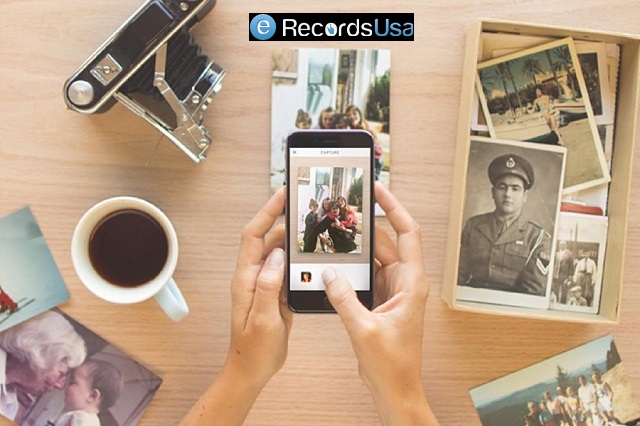
Digitizing Historical Pictorial Collections

Smartphones and tablets can download apps that allow cameras in the devices to scan documents.

In reality, many Droid and Apple devices have a built-in ability to scan and translate text documents or upload them to other applications that can turn them into PDFs, for instance.

It should be noted that this is best for dealing with a small number of pages. Of course, this is a viable alternative when office equipment is not available, and data from a printed document needs to be appropriated. 

It’s also possible to take photos with the camera on a smartphone and translate eventually that into a text document. This is a laborious process that is not conducive to regular use.

Flatbed Scanners
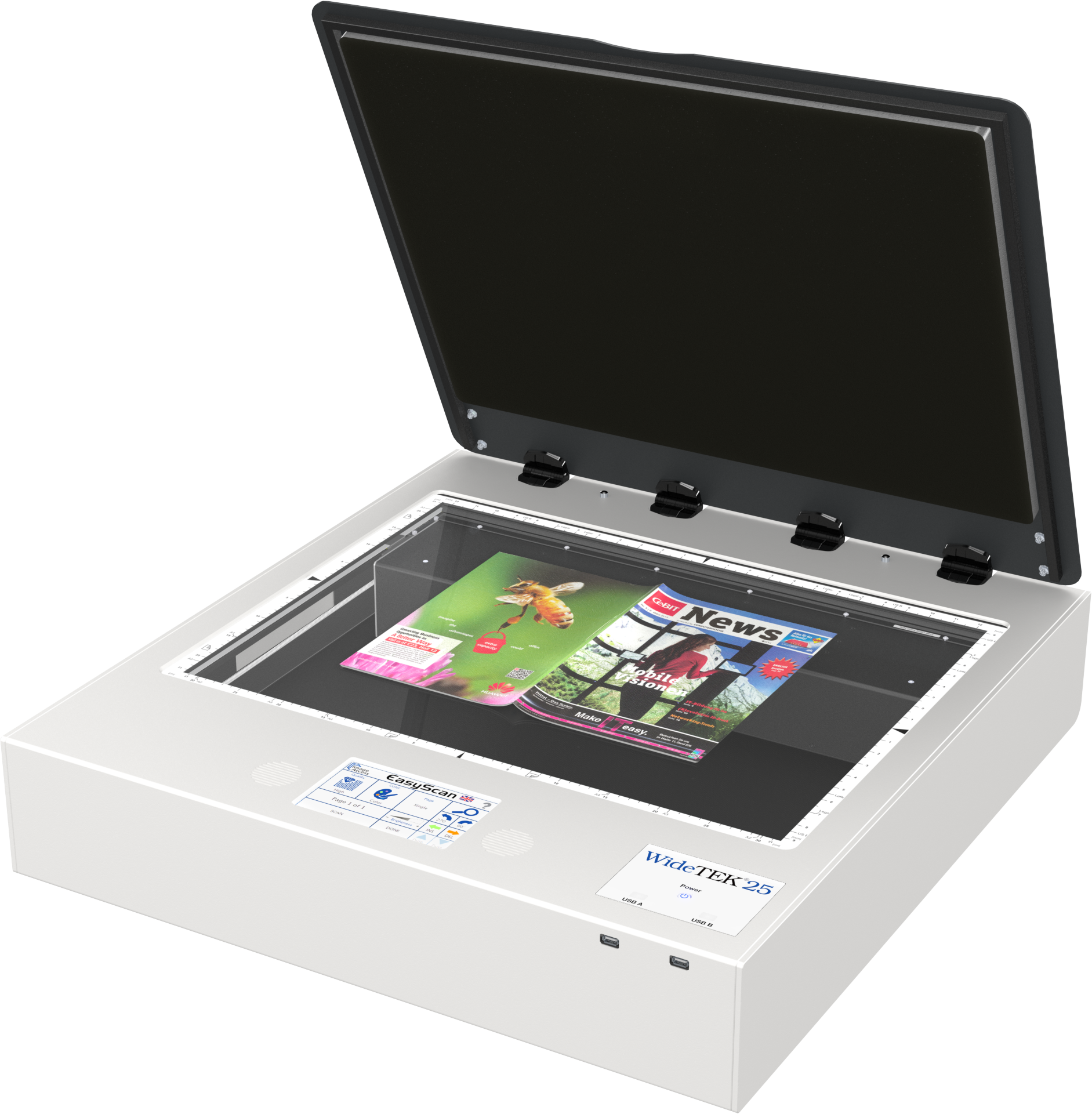
flat bed book scanners

These relatively inexpensive devices are quite useful for collecting digitized files for medium quality reproductions of paper documents. Again, flatbeds are best used for small numbers of pages since each document must be placed on the glass by hand and removed once the scan is complete. By their design, they tend to take up a fair amount of space.

Multifunction Scanners (MFD)

Somewhat more expensive but having a smaller footprint on your desk are multifunction scanners. The advantage of MFDs, apart from their size, is that many pages can be loaded and scanned simultaneously. 

The Out-Sourcing Alternative

Despite living in a “paperless age,” the number of paper documents we accumulate daily seems only to be growing, sometimes exponentially.

Many professionals rely upon digitizing firms that come in regularly and translate documents into digital formats.

Typically, these companies can do the work on-site to alleviate worry about the security of the data.

It can often be arranged so that such firms will scan, index, demonstrate the secured and saved files, and then shred the original documents.

Closing Thoughts

Digitizing our daily deluge of documents serves several purposes for us. It contributes to our organizational skills, frees us from filing, removes clutter from our workspaces, and speeds our workflow.

Once we establish a routine manner of digitizing the paper that comes our way, we will have one less continuing concern as well.

eRecordsUSA is specialized in providing Document Scanning Servcies like, Digitizing Paper Document Services / paper document scanning services  / Document Scanning Service.

Would you like to receive a free quote for Document Archival Services? Call +1.510.900.8800 or eMail us at he***@*********sa.com

Fill out the form below, to start your digitizing journey

What Our Client Says

Posted on Google Google
Daniel D. profile picture
Daniel D.
14 September 2026
Google star 1Google star 2Google star 3Google star 4Google star 5Trustindex verifies that the original source of the review is Google.
Easy to work with and fast turnaround!
Posted on Google Google
August Brenner profile picture
August Brenner
14 September 2026
Google star 1Google star 2Google star 3Google star 4Google star 5Trustindex verifies that the original source of the review is Google.
They were able to digitize 18 years of diaries and multiple yearbooks for me. The quality was excellent and the customer services was also excellent. The price was also very competitive. I highly recommend e-records!
Posted on Google Google
Brian Kaye profile picture
Brian Kaye
12 September 2026
Google star 1Google star 2Google star 3Google star 4Google star 5Trustindex verifies that the original source of the review is Google.
I turned to Document Scanning & Photos Digitizing Services (eRecord) for help converting a low‑quality microfilm of 18th‑century Polish census records into a digital format suitable for historical research. The technical demands of the project were considerable, yet eRecord devoted extraordinary time and care to the transfer. My use of AI enhancement significantly improved the legibility of the images, making the scans genuinely useful for scholarly work. Pankaj’s professionalism stood out: he kept me informed at every stage, explained the challenges clearly, and ensured the final product met the highest standard possible. I recommend Document Scanning & Photos Digitizing Services (eRecord) without reservation.
Posted on Google Google
Keith Kadokura profile picture
Keith Kadokura
11 September 2026
Google star 1Google star 2Google star 3Google star 4Google star 5Trustindex verifies that the original source of the review is Google.
I am a member of the Archives Group for the San Jose Buddhist Church Betsuin. One role of the Archives Group is to preserve our historical physical photos and documents. However, recent fires at the Lahaina and Seattle Buddhist Temples have created urgency for us to digitize our archives for storage in the Cloud for safekeeping. In the SJBCB Archives Room, we have many large-format, panoramic photos. The size of the largest photo is 54x8 inches, and many are longer than 40 inches. The oldest photo with a confirmed date was taken in 1925, and we have one photo we suspect is from 1911. We do not have a way to scan and digitize these large photos in our Archives Room. After searching for ways to scan and digitize our panoramic photos, I was fortunate to find eRecordsUSA. Mr. Sharma was very patient while listening to me describe our situation and requirements, and my asking about his equipment, procedures, and details about file formats and resolutions. Mr. Sharma agreed to provide sample scans for a few of our photos and let us review the results before we decided to proceed. The sample scans were amazing and we delivered 121 photos to eRecordsUSA for scanning and digitization. The staff at eRecordsUSA were very careful handling our fragile photos. They followed our requirements for file format and resolution, and for naming the files. The results exceeded my expectations and the pricing was reasonable. I happily recommend eRecordsUSA and will use their services in the future.
Posted on Google Google
Judy Baker profile picture
Judy Baker
25 August 2026
Google star 1Google star 2Google star 3Google star 4Google star 5Trustindex verifies that the original source of the review is Google.
I couldn't trust just any business to care for and digitize my Dad’s 200+ page handwritten journal, which is a one-of-a-kind family heirloom. After doing some preliminary research, I chose eRecordsUSA, and I am delighted with the quality of the finished pdf and accompanying image files. After speaking with Mr. Sharma and personally meeting with him to drop off the journal, it was crystal clear that he is an expert at this and really cared about preserving my Dad’s book. This business is very professional, highly responsive and trustworthy, and I would definitely drive to Fremont again (it’s a 45 minute drive one way) if I need their services. TIP: Be sure to call or email them to make an appointment because this isn’t a store where you can just drop in.
Posted on Google Google
Greg Archbald profile picture
Greg Archbald
17 August 2026
Google star 1Google star 2Google star 3Google star 4Google star 5Trustindex verifies that the original source of the review is Google.
In 1970-71 my then wife and I traveled to many different countries, taking a year and a quarter to circle the globe. Our parents kept all of our letters and postcards for us -- almost 200 items including flimsy aerogramme stationery with tiny handwriting. As a stack of papers, it would never be read by my children and grandchildren. As a scanned and digitized collection, it became a precious family treasure. It’s also priceless data that I can use with Claude AI to create keepsake documents for the family. Thank goodness I found eRecordsUSA -- the people who made it possible! The scans are perfect. The transcriptions are excellent. My originals were perfectly kept. Working with Pankaj and his team was a pleasure. I recommend eRecordsUSA highly as folks you can trust to do a great job with your precious memorabilia.
Posted on Google Google
Hiro Ikushima profile picture
Hiro Ikushima
6 August 2026
Google star 1Google star 2Google star 3Google star 4Google star 5Trustindex verifies that the original source of the review is Google.
I’m very happy with the quality of their service. They completed the job quickly and did an excellent job with the scanning. They also have specialized equipment that can handle large, delicate, and unusual documents that many other scanning services are not equipped to handle. I highly recommend their services to anyone looking for professional, high-quality document scanning.
Posted on Google Google
Sekandar Askaryar profile picture
Sekandar Askaryar
2 August 2026
Google star 1Google star 2Google star 3Google star 4Google star 5Trustindex verifies that the original source of the review is Google.
I was gifted an old book that my grandfather wrote in Afghanistan. The book was in decent condition, but because it was written in Farsi, I wasn’t able to read it properly. Then I had an idea: with the help of AI, I could have it translated and finally read my grandfather’s work. This is where eRecordsUSA came in. They took on this project despite its many challenges and scanned the book with excellent quality. Now, I can preserve and share this treasure with the rest of my family. Our family is incredibly thankful for all the hard work eRecordsUSA put into this project. I couldn’t be happier with the final result.
Posted on Google Google
Stephen Wan profile picture
Stephen Wan
18 July 2026
Google star 1Google star 2Google star 3Google star 4Google star 5Trustindex verifies that the original source of the review is Google.
Great work, fast turnaround, and reasonable price.
Posted on Google Google
Donald Yu profile picture
Donald Yu
17 July 2026
Google star 1Google star 2Google star 3Google star 4Google star 5Trustindex verifies that the original source of the review is Google.
They helped me scanned thousands of photos and digitized my family's archives. They were very communicative and the pricing was fair. I think the biggest highlight is being able to trust them with some of the most important valuables in my life. Highly recommend!
Verified by Trustindex
Trustindex verified badge is the Universal Symbol of Trust. Only the greatest companies can get the verified badge who has a review score above 4.5, based on customer reviews over the past 12 months. Read more
Posted on Yelp Yelp
Brian K. profile picture
Brian K.
12 September 2026
Yelp star 1Yelp star 2Yelp star 3Yelp star 4Yelp star 5Verified
I turned to eRecord USA - Document Scanning & Photos Digitizing Services for help converting a low‑quality microfilm of 18th‑century Polish census records into a digital format suitable for historical research. The technical demands of the project were considerable, yet eRecord devoted extraordinary time and care to the transfer. My use of AI enhancement significantly improved the legibility of the images, making the scans genuinely useful for scholarly work. Pankaj's professionalism stood out: he kept me informed at every stage, explained the challenges clearly, and ensured the final product met the highest standard possible. I recommend eRecordsUSA - Document Scanning & Photos Digitizing Services without reservation.
Posted on Yelp Yelp
Keith K. profile picture
Keith K.
11 September 2026
Yelp star 1Yelp star 2Yelp star 3Yelp star 4Yelp star 5Verified
I am a member of the Archives Group for the San Jose Buddhist Church Betsuin. One role of the Archives Group is to preserve our historical physical photos and documents. However, recent fires at the Lahaina and Seattle Buddhist Temples have created urgency for us to digitize our archives for storage in the Cloud for safekeeping. In the SJBCB Archives Room, we have many large-format, panoramic photos. The size of the largest photo is 54x8 inches, and many are longer than 40 inches. The oldest photo with a confirmed date was taken in 1925, and we have one photo we suspect is from 1911. We do not have a way to scan and digitize these large photos in our Archives Room. After searching for ways to scan and digitize our panoramic photos, I was fortunate to find eRecordsUSA. Mr. Sharma was very patient while listening to me describe our situation and requirements, and my asking about his equipment, procedures, and details about file formats and resolutions. Mr. Sharma agreed to provide sample scans for a few of our photos and let us review the results before we decided to proceed. The sample scans were amazing and we delivered 121 photos to eRecordsUSA for scanning and digitization. The staff at eRecordsUSA were very careful handling our fragile photos. They followed our requirements for file format and resolution, and for naming the files. The results exceeded my expectations and the pricing was reasonable. I happily recommend eRecordsUSA and will use their services in the future. Keith K.
Posted on Yelp Yelp
Jonathan R. profile picture
Jonathan R.
11 September 2026
Yelp star 1Yelp star 2Yelp star 3Yelp star 4Yelp star 5Verified
Sharma was great to work with, he jumped right on a difficult large format very old, very important set of drawings and scanned them to PDF for me. He has the capability to do large 24"x36" and even larger documents! Would highly recommend. Jonathan Reimer HMI Industrial (California's #1Industrial Contractor) S
Posted on Yelp Yelp
Hiroyuki I. profile picture
Hiroyuki I.
6 August 2026
Yelp star 1Yelp star 2Yelp star 3Yelp star 4Yelp star 5Verified
Second time review. I'm very happy with the quality of their service. They completed the job quickly and did an excellent job with the scanning. They also have specialized equipment that can handle large, delicate, and unusual documents that many other scanning services are not equipped to handle. I highly recommend their services to anyone looking for professional, high-quality document scanning.
Posted on Yelp Yelp
Sekandar A. profile picture
Sekandar A.
2 August 2026
Yelp star 1Yelp star 2Yelp star 3Yelp star 4Yelp star 5Verified
I was gifted an old book that my grandfather wrote in Afghanistan. The book was in decent condition, but because it was written in Farsi, I wasn't able to read it properly. Then I had an idea: with the help of AI, I could have it translated and finally read my grandfather's work. This is where eRecordsUSA came in. They took on this project despite its many challenges and scanned the book with excellent quality. Now, I can preserve and share this treasure with the rest of my family. Our family is incredibly thankful for all the hard work eRecordsUSA put into this project. I couldn't be happier with the final result.
Posted on Yelp Yelp
Donald Y. profile picture
Donald Y.
17 July 2026
Yelp star 1Yelp star 2Yelp star 3Yelp star 4Yelp star 5Verified
They helped me scanned thousands of photos and digitized my family's archives. They were very communicative and the pricing was fair. I think the biggest highlight is being able to trust them with some of the most important valuables in my life. Highly recommend!
Posted on Yelp Yelp
Kevin H. profile picture
Kevin H.
20 June 2026
Yelp star 1Yelp star 2Yelp star 3Yelp star 4Yelp star 5Verified
I have a precious hardbound book that my mother made for me with our family history documented in it. I had been looking for someone who could digitize it. Because of the irreplaceable nature of the book, it was critical that I could trust the service to handle my book with care, both in the shipping to and from and the digitizing process. I found eRecordsUSA through a ChatGPT search. They had outstanding reviews on all fronts. They lived up to those reviews. The inquiry process was easy, clear, quick and responsive through their online contact process, and I did have one call with a representative. Their pricing was fair. The digitizing process of my book, which was several hundred pages, was very quick, being done the same week in which they received it. Turnaround shipping was also quick and reliable, just as promised. And the book came back in pristine condition. Communication was excellent throughout. When they quoted me a price, had to estimate the number of pages because the pages are not numbered. Turns out that there were more than double my estimate. However, eRecordsUSA honored the quoted price. Integrity.... So, I highly recommend eRecordsUSA if you are in the market for digitizing services. They fully met and in some ways exceeded my high expectations.
Posted on Yelp Yelp
Bruce G. profile picture
Bruce G.
9 June 2026
Yelp star 1Yelp star 2Yelp star 3Yelp star 4Yelp star 5Verified
Museum level quality scan! Top quality service. Excellent work. Highly recommend. I had my old book scanned with top quality result.
Posted on Yelp Yelp
Cameron V. profile picture
Cameron V.
24 April 2026
Yelp star 1Yelp star 2Yelp star 3Yelp star 4Yelp star 5Verified
Excellent work as always. Great scan quality, customer service, and affordability. I am a repeat customer and value working with eRecordsUSA on all my large volume scanning projects.
Posted on Yelp Yelp
Gary M. profile picture
Gary M.
30 March 2026
Yelp star 1Yelp star 2Yelp star 3Yelp star 4Yelp star 5Verified
These guys are great. So easy to work with and the scans are perfect. I would highly recommend them for document scanning where the documents are odd sizes or need to be easily legible.
Verified by Trustindex
Trustindex verified badge is the Universal Symbol of Trust. Only the greatest companies can get the verified badge who has a review score above 4.5, based on customer reviews over the past 12 months. Read more